
A Git client that pulls, merges and pushes for you.
It keeps your branches up to date in the background, saves your work before anything risky, and stops to ask when something needs a decision. Free, for Windows, Linux and Android.
Windows 10 and 11, 64-bit · about 100 MB · no account
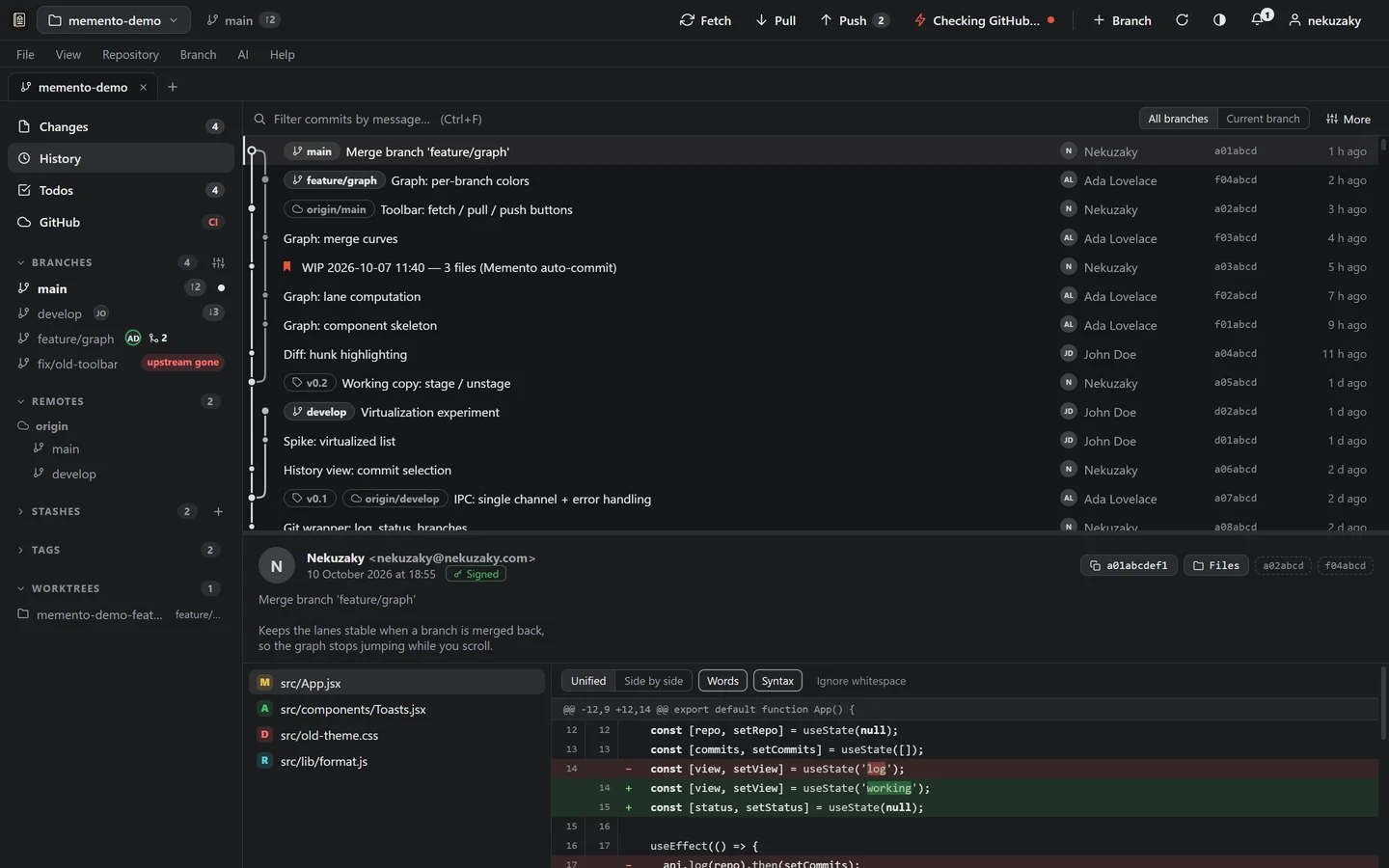
The history. Every branch, merge and tag on one graph. Initials next to a branch are teammates working on it right now.
Demo repository · captured 10 Oct 2026While you were working.
Memento writes down what it did, in the words below. The red marks are what it did on its own. The last line is where it stopped, and nothing after it happened.
- Auto-pull: 3 commits pulled
- Auto-merge: feature/search → developmerged without leaving your branch, checked
- Auto-commit: 4 files saved on feature/cart
- Auto-push: 1 commit pushed to origin/feature/cart
- Auto-merge paused: feature/cart conflicts with develop — nothing was changedResolve it by hand when you are ready.
done on its ownwaiting for youAn example morning; the messages are the app's own.
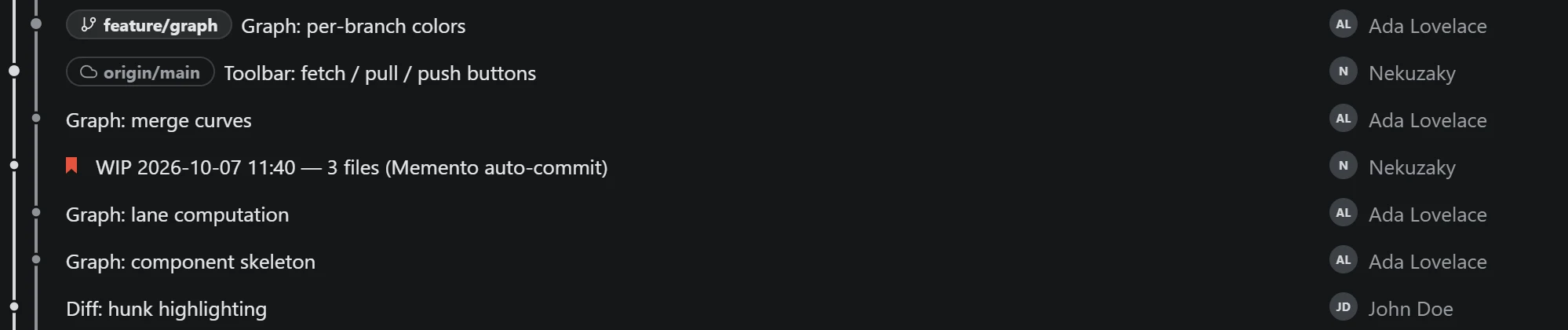
Five rules, each one a switch.
Turn them on per repository, and for the branches you choose. What matters as much as what each rule does is where it refuses to go on.
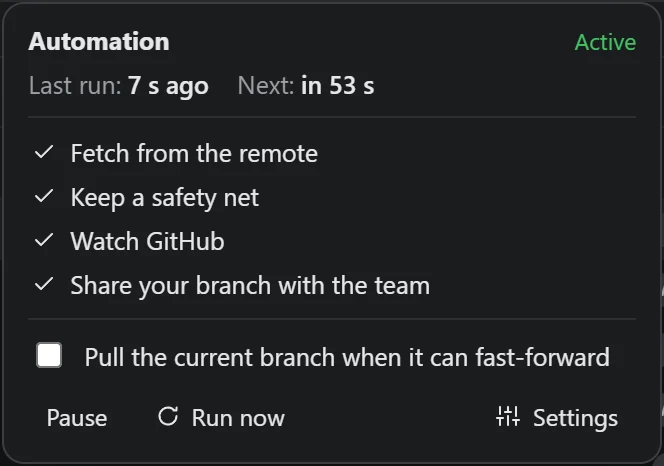
| Rule | When | What it does, and where it stops |
|---|---|---|
| Auto-pull | Every minute | Fetches, then moves your branch forward when there is nothing to decide. If your branch has commits of its own, it stops and says how many each way. It never merges or rebases behind your back. |
| Auto-merge | When a merge is clean | Merges a branch into its target in a throwaway worktree, so your files don't move. Give it a command like npm test and the target only moves if it passes. A conflict undoes the merge at once. |
| Safety net | Every ten minutes, and before a discard | Snapshots your uncommitted work into a ref of its own, never pushed and never in your history. Every snapshot is in Repository → Safety net. |
| Auto-commit | After a quiet moment | Saves work in progress as WIP … (Memento auto-commit). Only files Git already tracks, so a stray .env is never committed for you. A pre-commit hook that refuses has the last word. |
| Auto-push | When you're ahead | Pushes what the remote cannot reject: never when your branch is behind, never with --force, and a new branch only if you ask. |
When it stops, it says so.
These are the app's own words, the ones you'll read when a rule refuses to go on.
- Your branch and its remote both moved
Auto-pull paused: main diverged from origin/main
- A merge would conflict
Auto-merge paused: feature/cart conflicts with develop — nothing was changed
- The merge is clean, but your test fails on it
Auto-merge held back: feature/cart → develop does not pass the check
- Before you throw changes away
Memento saves a snapshot first, so you can undo it right after, or later from Repository → Safety net.
Conflicts in three columns
Yours, the original and theirs, with what each side changed highlighted. Where only one side changed, or both made the same change, one click settles it. J and K move between blocks, 1 to 4 choose.
Undo
A commit, a merge, a discard, a deleted branch, stash or todo: the notification that confirms it has an Undo button, and Ctrl Z does the same.
Git errors in plain words
When Git refuses, you read what happened and what to do next, with a button for it when there is one.
The team's todo list is a ref in your repository.
No server and no account. It lives under refs/memento/data, outside every branch,
so it is the same on all of them and never shows up in a diff. Whoever fetches and pushes shares it.
$ git log --oneline refs/memento/data
9a2f1b5 memento: todo update
e30345c memento: todo update
a2021ea memento: todo add
81a1967 memento: todo add

$ git show refs/memento/data:todos.json
{
  "items": [
    {
      "id": "mgq3m9cd",
      "text": "Fix the cart total rounding",
      "done": false,
      "assignee": "Bob",
      "branch": "feature/cart",
      "flag": true,
      …
Tied to the work
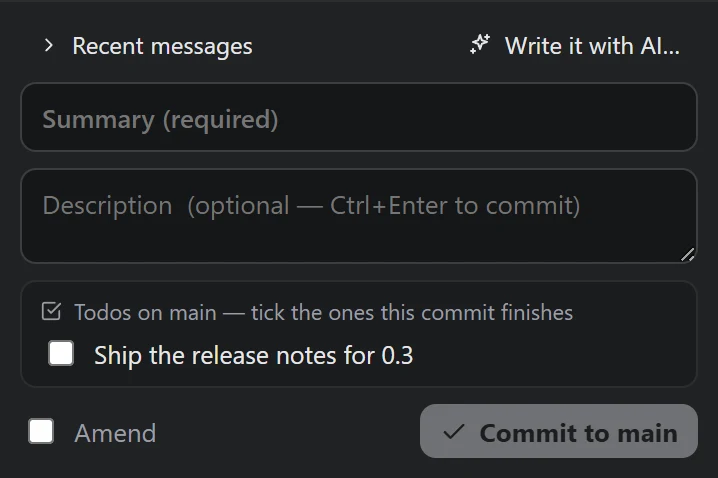
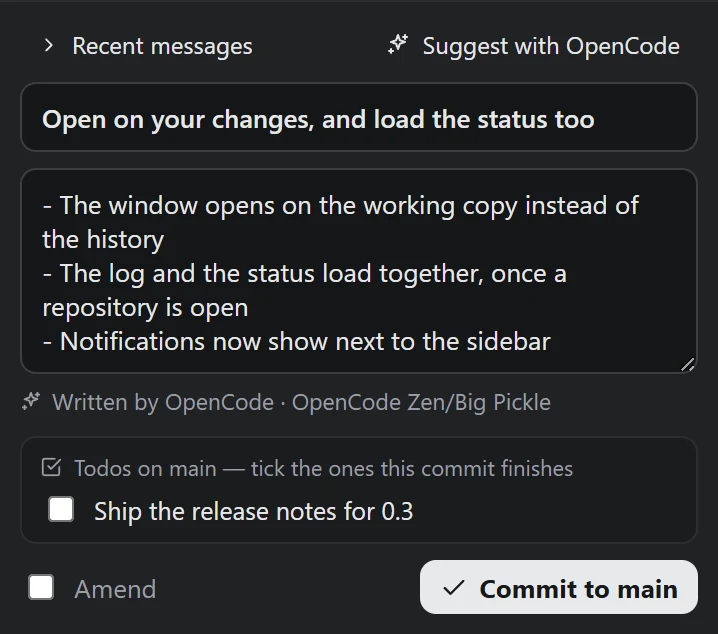
Link a todo to a branch. The commit box lists that branch's open todos, to tick the ones the commit finishes, and finishing the branch offers to mark the rest done.
Edited by two people at once
Every field keeps its latest change. If one person ticks a todo while another renames it, both changes stay.
On your phone
The Android app opens on what's waiting for you: reviews, pull requests ready or broken, and the team's todos, which you can tick from there. It talks to GitHub directly.
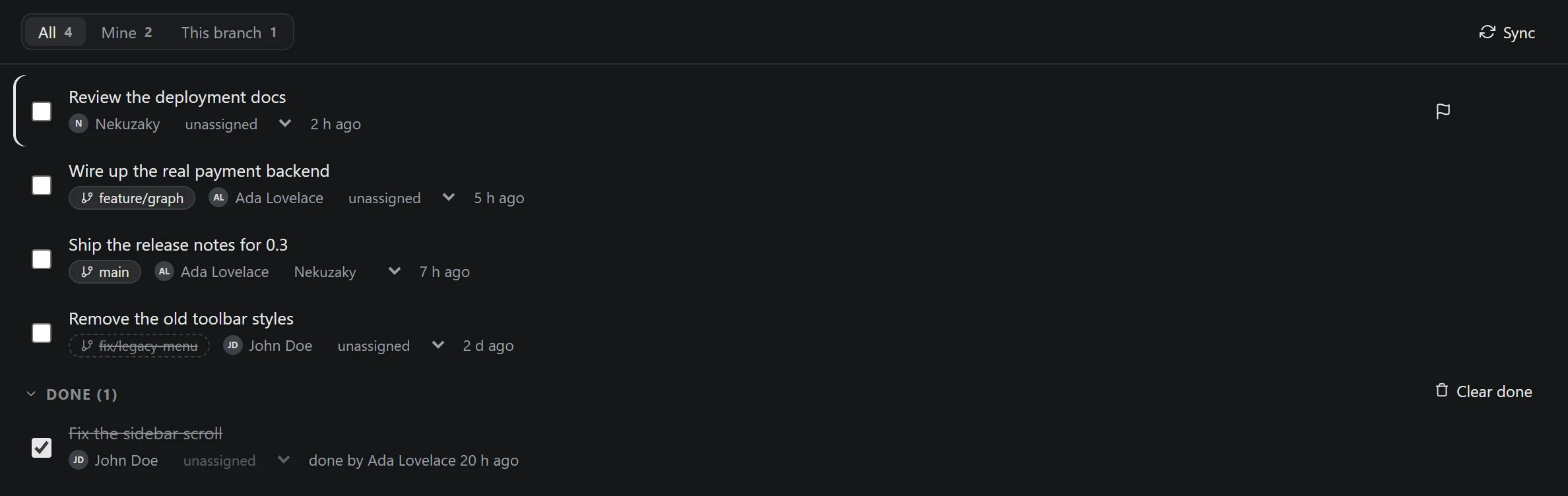
A flag for what comes first, a branch for each task, and who finished what. A branch that no longer exists stays written, struck through.
Demo repository · captured 10 Oct 2026The commit message, written by the AI you pick.
Suggest, above the commit box, asks an AI agent to write the message from what you staged: a summary, then a few lines on what changed and why, in the language of your last commits. You read it, change what you like, and commit. Nothing is committed for you.
The agent you already use
GitHub Copilot uses the GitHub account you signed in with: nothing else to set up, and Copilot Free is enough. Claude, Gemini, Codex, Cursor, OpenCode and the other agents of the ACP registry, the list Zed and JetBrains use, install in one click from the AI menu and sign in their own way. OpenCode works without an account.
And you know who wrote it
Keep an agent's default model or pick one. The line under the message names the agent and the model, and Restore mine brings back what you had typed.
What the agent sees, and what it can't do
- Only what you staged, when you click. The first time, Memento asks before sending anything.
- Never your secrets:
.envfiles, keys, and any file whose changes look like a token stay on your machine. - It cannot read your files, run a command or change anything. One that tries is stopped, and its answer thrown away.
- It runs for one answer, then it is stopped.
And the rest of Git.
A complete client, so you don't need a second one for the hard days.
- Stage and discard single lines. Amend, reword, reorder and squash by dragging.
- Diffs side by side, with the changed words highlighted and syntax colors.
- The history of a file through its renames, or of a few lines. Blame and the file tree at any commit.
- Search by message, author, file, code or date.
- Conflicts foreseen before a merge, and four ways to merge, squash included.
- Reset to a commit with a snapshot first, patches, and a guided search for the commit that broke it.
- Branch comparison, worktrees, stashes, tags, cherry-pick and revert of several commits, rebase, reflog.
- GPG and SSH signing, and a work identity that stays on work repositories.
- Pull requests, checks and issues from GitHub, in the same window.
- Tabs, a command palette, and your own diff and merge tool if you prefer it.
Made by one person.
I make Memento, and I use it every day. It's free and needs no account. It collects nothing about you or your code: Git runs on your machine, the app only talks to GitHub if you sign in, and to an AI agent only if you install one and ask it for a message.
If it gets something wrong, or doesn't do something it should, write to me. I read every message. If it saves you time, you can buy me a coffee.
Nekuzaky
Download.
The app updates itself after the first install.
| Windows | Windows 10 and 11, 64-bitAbout 100 MB. Installs for your user, without administrator rights. The portable build doesn't update itself. | Memento-Setup.exePortable |
|---|---|---|
| Linux | 64-bit. Ubuntu 22.04, Debian 12, Fedora 38 or newerThe AppImage updates itself; the .deb when you install the next one. Notes for Linux | Memento.AppImage.deb |
| Android | Android 7 and upAbout 12 MB. Not on the Play Store yet: install the APK once, it updates itself after that. | Memento.apk |
Free to use, with no account. Memento is not open source; the legal page says what that means.
What Memento won't do.
Automation you can leave running needs limits that don't move. These are the ones it keeps.
- Force-push on its own. Auto-push never uses
--force, in any form. - Merge or rebase your branch when it has diverged from its remote.
- Commit a file Git doesn't already track, unless you tick that box.
- Delete a branch by itself, even one whose remote is gone.
- Discard your changes without a snapshot to bring them back.
- Send your code to an AI on its own. An agent sees what you staged when you ask, never your secrets.
- Report anything about you or your code. No telemetry, no account.